1.2 Introduction to Kubernetes
What is Kubernetes?
Kubernetes, often abbreviated as K8s, is an open-source platform for automating the deployment, scaling, and management of containerized applications. It was originally developed by Google and is now maintained by the Cloud Native Computing Foundation (CNCF). Kubernetes has become the de facto standard for container orchestration and is widely used in cloud native application development.
Kubernetes (K8s) is a powerful yet user-friendly platform for managing containerized applications. Its primary goal is to ensure your containers run smoothly and stay seamlessly connected, automating tasks like scaling, load balancing, storage management, updates, and security. By handling these complexities, Kubernetes frees you from manual intervention, letting you focus on building and innovating.
For example, during peak traffic, Kubernetes can automatically scale your web application to handle increased demand, ensuring optimal performance. It can also self-heal by restarting failed containers or replacing faulty nodes, ensuring minimal downtime.
Key Features of Kubernetes:
- Automated Scheduling: Kubernetes automatically schedules containers based on resource requirements and constraints without manual intervention.
- Self-Healing: Kubernetes restarts failed containers, replaces them, and reschedules Pods when nodes die.
- Horizontal Scaling: Kubernetes allows applications to scale up or down based on CPU usage or custom metrics.
- Load Balancing and Service Discovery: Kubernetes provides built-in service discovery and load balancing for distributing traffic across containers.
- Storage Orchestration: Kubernetes allows containers to mount persistent storage and provides support for various storage backends.
Why Use Kubernetes?
Kubernetes simplifies the management of containerized applications by automating many of the complex tasks associated with running containers in production. It provides:
- Portability: Kubernetes can run on any infrastructure (on-premises, cloud, hybrid).
- Resilience: Applications can automatically recover from failures without human intervention.
- Efficiency: Kubernetes optimizes resource utilization by managing the underlying infrastructure effectively.
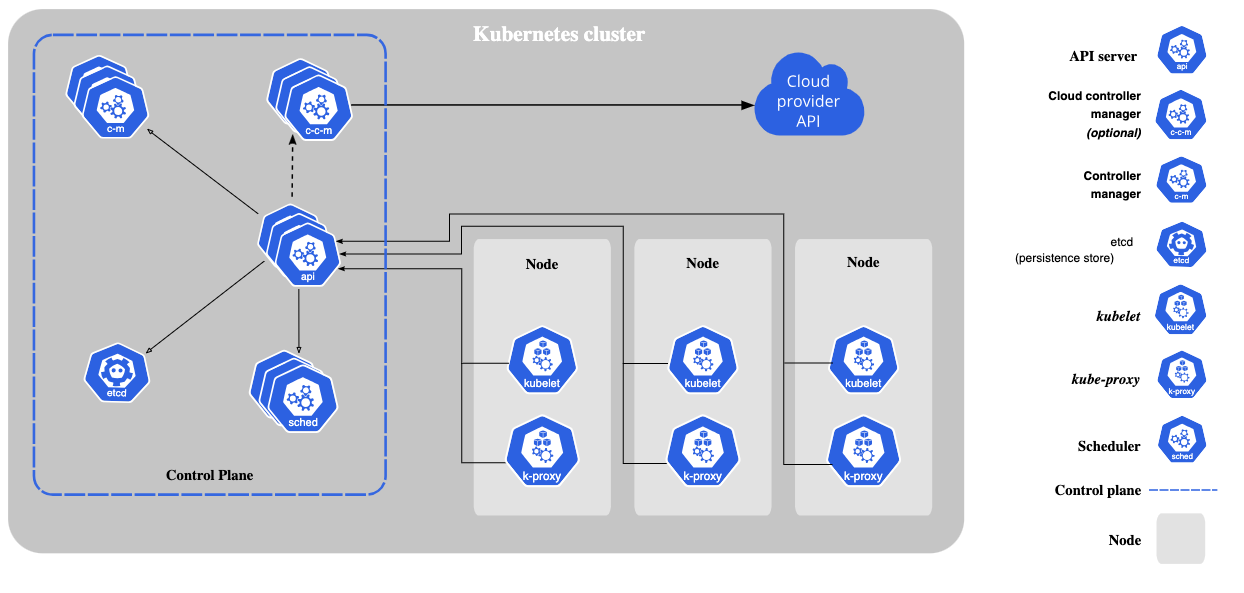
The Core Components of Kubernetes
Kubernetes consists of several core components that work together to manage and orchestrate containerized applications:
1. Master Node:
The master node is responsible for managing the Kubernetes cluster. It consists of the following components:
- API Server: The Kubernetes API server is the entry point for all the administrative tasks in a Kubernetes cluster. It exposes the Kubernetes API.
- Scheduler: The scheduler assigns Pods to nodes based on resource availability and other constraints.
- Controller Manager: The controller manager ensures that the desired state of the cluster matches the current state.
- etcd: A distributed key-value store used to store all cluster data.
2. Worker Nodes:
Worker nodes run the containerized applications. Each worker node contains:
- Kubelet: An agent that ensures containers are running in Pods as defined in the PodSpec.
- Kube-proxy: A network proxy that runs on each node in the cluster, maintaining network rules for load balancing.
- Container Runtime: The software responsible for running containers (e.g., Docker, containerd).
Kubernetes Objects:
Kubernetes uses several key objects to represent the desired state of the system:
- Pod: The smallest deployable unit in Kubernetes, which can contain one or more containers.
- Deployment: Defines the desired state for Pods and ensures that the specified number of Pods are running.
- Service: An abstraction that defines a logical set of Pods and a policy by which to access them.
- ConfigMap: Provides configuration data that can be consumed by Pods.
- Secret: Stores sensitive data such as passwords and API keys.
How Kubernetes Works
Kubernetes works by constantly monitoring the desired state (as specified by users) and comparing it with the actual state of the system. If there are discrepancies, Kubernetes takes action to bring the actual state in line with the desired state.
Example Workflow:
- A developer defines the desired state of the application (e.g., 3 replicas of a web server) in a YAML file.
- Kubernetes reads the YAML file and creates the necessary Pods and resources to match the desired state.
- The Kubernetes scheduler ensures that the Pods are scheduled on appropriate nodes based on resource constraints.
- If a Pod fails or a node goes down, Kubernetes automatically reschedules the Pod on another node to maintain the desired state.
apiVersion: apps/v1
kind: Deployment
metadata:
  name: nginx-deployment
spec:
  replicas: 3
  selector:
    matchLabels:
      app: nginx
  template:
    metadata:
      labels:
        app: nginx
    spec:
      containers:
      - name: nginx
        image: nginx:latest
        ports:
        - containerPort: 80
In this example, a Deployment is defined with 3 replicas of the Nginx web server. Kubernetes ensures that 3 Pods are running the Nginx container and automatically scales up or down as necessary.
Conclusion
Kubernetes is a powerful platform that simplifies the management of containerized applications by automating deployment, scaling, and maintenance. Understanding Kubernetes fundamentals, such as its architecture and key objects, is essential for managing cloud native applications efficiently. In the next section, we will explore the Kubernetes resources and architecture in more detail.